


Reporting
You may access the Reports landing page by selecting the Reports icon on the left-hand side of your Navigate Account. You may read the Reports article to learn more about the various Reports.

Navigates V3 Reports have advanced filtering options and new grid styling and functionality.
- Detailed information about V3 Reports, can be found in the following article: Help Center V3 Reports. To read this article, you must be signed into your Navigate account. If you are not signed into your account, you will be prompt to do so.
Saving Your Report
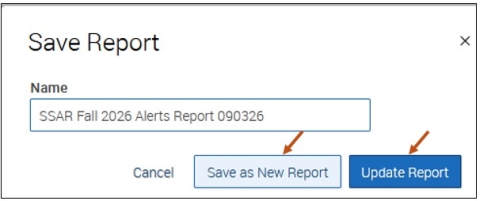
The Save As link is located near the top right corner of the Report.

After selecting the Save As link, you can:
- Save the Report by selecting the Save as New Report button.
-
Update the Report by selecting the Update Report button. Updating the Report is useful when the Report was previously saved and maybe you just went back into the Report and modified your data filters and you do not want or need to save as a new Report again.
Viewing Your Saved Reports
You may view your Saved Reports by accessing your Reports landing page by selecting the Reports icon on the left-hand side of your Navigate Account.
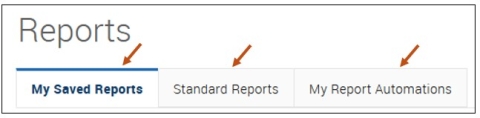
Your Reports page includes the following three tabs:
- My Saved Reports
- Standard Reports
- My Report Automations
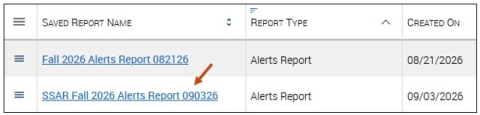
Select the link for which Report you would like to view and run.
Running Your Reports on a Schedule
A Scheduled Report is an automated rerun of a saved Report, delivered by email on a daily, weekly, or monthly basis, using your saved filters for quick in-app viewing or export to the Download Center.
Feature Overview
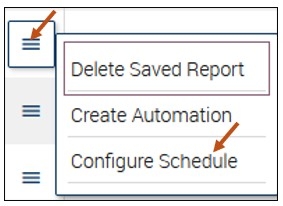
The Report scheduling feature in Navigate allows staff to automate the rerunning and retrieval of Saved Reports. Found under the My Saved Reports tab, staff can click the hamburger menu beside a Report and select Configure Schedule to set up a schedule.
Select the My Saved Reports tab.
Select the link for which Report you would like to view and run.
Select the hamburger menu for the appropriate Report row, then select Configure Schedule.
Reports can be scheduled to run daily, weekly, or monthly—though only one schedule is allowed per Report. Once scheduled, staff receive an email notification when the Report is ready. The Report is emailed to your Buffalo State University Outlook account. Staff can choose to run the Report directly in Navigate, maintaining all saved filters for immediate use, or export it to the Download Center for deeper offline analysis.
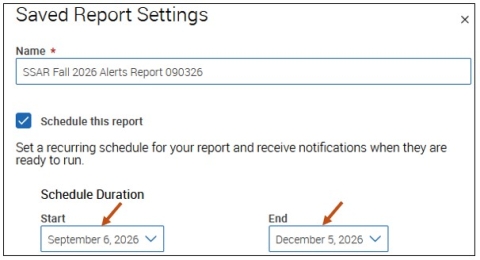
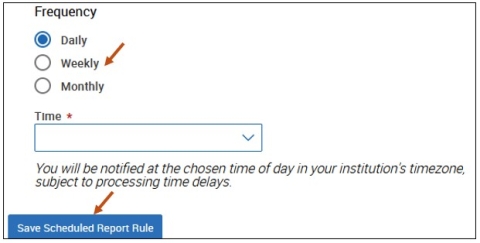
-
Name
A free text field for entering the custom name of the report.
-
Schedule this report
A checkbox to enable or disable report scheduling.
-
Schedule Duration Start/End
A calendar picker to select the start and end dates for the report schedule.
-
Frequency
A drop-down menu to choose how often the report runs (Daily, Weekly, Monthly).
-
Time
A drop-down to select the time of day the report will run. (8:00am - 6:00pm)
Once a schedule is configured, click the Save Scheduled Report Rule button.
Receiving Email Notifications When Your Reports Are Ready
Staff will be notified via email when the Report is ready to be run or exported. The Report is emailed to your Buffalo State University Outlook account.
From: Robert Hudson <hudsonrj@navigatesupport.buffalostate.edu>
Sent: Sunday, September 6, 2026 8:00 AM
To: Hudson, Robert J <hudsonrj@buffalostate.edu>
Subject: Your scheduled report

Scheduled Report Occurrence
This is your scheduled report. Details are included below.
Saved Report:
SSAR Fall 2026 Alerts Report Hudson 090326

Please Note: Links in the email are unique to the user and cannot be shared with others.
Run Report
When selected from the notification email, the link opens the Report page (user must authenticate first) and prepopulates the saved filters; this option is best if you want to take action on your Report results.
Export to Download Center
When selected from the notification email, the link opens the Downloads Center page (user must authenticate first) where the Report is generated and you can download the report data in CSV format; this option is best if you are looking to complete a deeper analysis on the data.
Actions available on this page:
- Export Again: Click the Export again link above the grid to regenerate the report.
- Download the Report: Click the download URL to export the report in CSV format.
See Previous Occurrences
When selected from the notification email, the link opens the {Name of the Report} Previous Occurrences page to view past instances when the Report was run.