

A Case Closed Email Notification
From: SUNY-Buffalo State University - Navigate Student Success <no-reply@navigate.eab.com>
Sent: Monday, March 23, 2026 3:55 PM
To: Staff User Last Name, First Name (staffusername @ buffalostate.edu)
Subject: Case Closed: (Student First Name and Last Name)

Case Closed: (Student First Name and Last Name)
Recently, you issued an alert for one of your students. We wanted to share with you the outcome of the case. The alert was for:
N/A: N/A
Student
(Student First Name and Last Name)
Alert Reasons
Meet with Your Academic Advisor
Alert Issued on
March 23
Case Outcome
Discussed concern with student.
Case Comments
Here, you will see any comments provided by the staff user who closed the Case.
Closed by
(Staff User First and Last Name)
Closed on Date
March 23

Please Note:
- The staff user who opens a Case will receive the email notification when a Case is closed.
Recently, you issued an alert for one of your students. We wanted to share with you the outcome of the case. The alert was for:
{$course_number}: {$course_name}
- This is where the course number (BIO-211) and course name (INTRO CELL GENETICS) merge tags are being used. In the above Case example, the Alert issued for the student was not associated with a course, so the merge tags did not have any data to pull from. As a result, the email displays “N/A: N/A.”
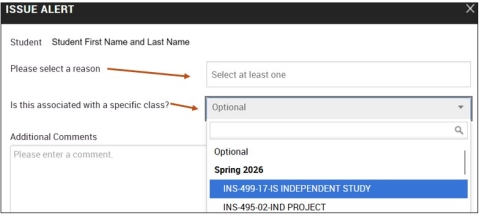
Step 1: Select an Alert Reason.
Step 2: If the Alert Reason you select is associated with a course, select the appropriate course from the drop-down menu. This is an optional step, but is helpful if the Alert being raised is associated with a course.
- The {$course_number}: {$course_name} merge tags will display as “N/A: N/A” when Alerts are issued in bulk, as merge tags are not able to interpret multiple courses or sections at once.