

Banner Attendance Tracking: An Early-Intervention Tool
Beginning this semester (Fall 2026), instructors are expected to maintain attendance records in Banner. Please refer to the detailed attendance guidance document recently circulated via email for specific instructions, submission timelines, and setting-specific methods.
The attendance entered into Banner will be imported daily into Navigate so that academic advisors and other support staff can view student attendance patterns. To view a students attendance in Navigate, please follow these steps.
1. Search for your student and go to their Student Profile and select their Courses tab.

2. You can view the number of absences located in the Absence column.
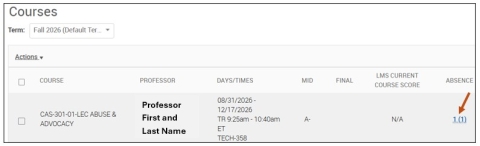
3. After selecting 1 (1), you will see the following:
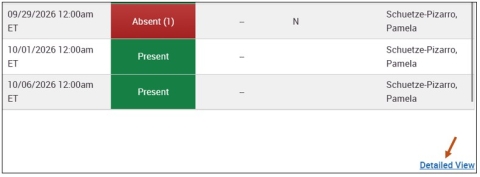
4. Selecting the Detailed View link will provide additional information.